
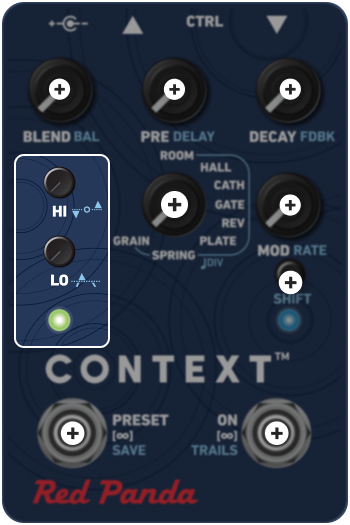
The HI and LO controls adjust the high and low frequency response of the reverb; this is known as reverb damping.
Above 9:00, the controls act as shelving filters to adjust the high and low frequency decay of the reverb; LO acts as a highpass filter, and HI acts as a lowpass filter. Set both to 3:00 for a flat response. Above 3:00, there is a slight boost.
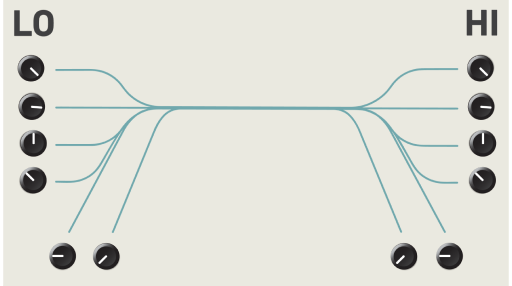
Turning the LO control down can help prevent the reverb from sounding muddy with low-frequency signals, or create a thin and "airy" reverb sound. Turning the HI control down creates a darker reverb. Boosting the high frequencies will add presence.
Hold SHIFT while turning the knobs to adjust reverb dynamics. Both of the dynamics controls are used together to adjust the reverb trail according to input level.

RELEASE
The 'release' control determines whether the reverb will duck or expand in response to new input, and sets the amount of time it takes for the reverb signal to return to its normal level. Time is increased from 30 - 3000 ms as you move in either direction.
-
 DUCKING
When the input level exceeds the threshold, the reverb "ducks" below loud notes, and comes back as the note decays. Quiet notes have more reverb; loud notes have less. Use reverb ducking to increase clarity by reducing the reverb level during your instrument's attack or while playing loud. -
 DYNAMICS OFF
Reverb level is unaffected by input level. -
 EXPANSION
When the signal level drops below the threshold, the reverb input signal is reduced. Loud notes have full reverb, notes below the threshold have less reverb. Use expansion with a quick release to create unnatural reverb tails, where the level falls off rapidly, or to emphasize loud chords and apply more subtle reverb to melodies.

THRESHOLD
The ‘threshold’ control sets the signal level at which reverb dynamics kick in; the ‘release’ control must also be set to the left or right for ducking or expansion.
Moving clockwise raises the threshold. The left LED changes color to indicate the signal level relative to the threshold:
-
 Off - signal is below -48 dBFS.
-
 Green - signal level is below threshold.
-
 Yellow - signal level is at threshold.
-
 Red - signal level is above threshold.
The threshold control should be adjusted based on your playing dynamics, signal level, and desired effect. It may need to be adjusted if you change your instrument, pickups, or signal path..